GlassWire
Best known for a visual network graph, bandwidth history, alerts and Windows firewall controls. Its official feature page also lists RDP connection detection.
Best fit: visual network and bandwidth monitoringA practical comparison, not a universal winner
All three make Windows activity easier to inspect, but they solve different problems. This comparison shows where each tool is strongest and where it is not the right fit.
There is no honest one-size-fits-all winner here. The better choice depends on whether you mainly need network history, privacy filtering or a guided Windows security response.
Best known for a visual network graph, bandwidth history, alerts and Windows firewall controls. Its official feature page also lists RDP connection detection.
Best fit: visual network and bandwidth monitoringPrivacy-first application firewall with system-wide filter lists, per-app rules and DNS-over-TLS. The core product is free and open source.
Best fit: privacy filtering and secure DNSGuided Windows overview for processes, TCP connections, local events and common remote-access software, combined with Attachment Guard and deliberate Shield checks.
Best fit: understandable security checks and focused response“Not listed” means the reviewed official feature pages did not present it as a main function. It does not claim that a product can never support a related workflow.
| Point | GlassWire | Portmaster | CMC Sentinel |
|---|---|---|---|
| Main focus | Visual network history, bandwidth, alerts and Windows firewall management. | Privacy filtering, per-app network control and secure DNS. | Guided Windows security visibility, remote-access response, attachment checks and Shield checks. |
| Published desktop platforms | Windows and Windows Server are covered in the official desktop guide. | Windows and Linux. | Windows 10 and 11, x64. |
| Network visibility | Live and historical graph, apps, hosts, traffic types and bandwidth usage. | Real-time application connections, history and bandwidth visibility depending on plan. | Active TCP connections shown together with process and local-event context. |
| Blocking and firewall | Click-to-block and bidirectional firewall controls are listed as Premium features. | Block connections individually, globally or with per-app rules; privacy filter included in the core product. | Not a general per-app firewall. It provides focused controls for selected remote-access apps and supported Windows remote-access paths. |
| DNS privacy | DNS server settings monitoring is listed; encrypted DNS routing is not the product's stated core focus. | Routes DNS through DNS-over-TLS and offers configurable providers. | No built-in encrypted DNS routing. |
| Remote-access help | Official features include RDP connection detection and remote server monitoring. | No dedicated RDP response workflow is presented on the reviewed feature page. | Highlights common remote-access software, can stop selected tools and can lock supported Windows remote-access paths. |
| Files and personal checks | The official pages focus on network and system monitoring. | The official pages focus on network privacy and filtering. | Attachment Guard plus deliberate Shield checks for supported files, domains and personal identifiers. |
| Price at review date | Free tier; Personal Premium listed from $2.99/month, paid annually and sold by licence count. | Free tier; Plus €40/year; Pro €8/month or €80/year. Paid plans list up to five devices. | €19.90 for one month or lower monthly equivalent on longer terms; up to five active PCs in one private household. |
| Antivirus replacement? | No. GlassWire calls itself a second line of defence and recommends a separate primary antivirus. | No. Portmaster's FAQ says it focuses on privacy and does not provide malware detection. | No. Sentinel explicitly complements Microsoft Defender, updates, secure accounts and backups. |
Do not stack low-level network or firewall tools blindly. If you already use GlassWire, Portmaster, a VPN or a managed security suite, check compatibility before enabling overlapping controls.
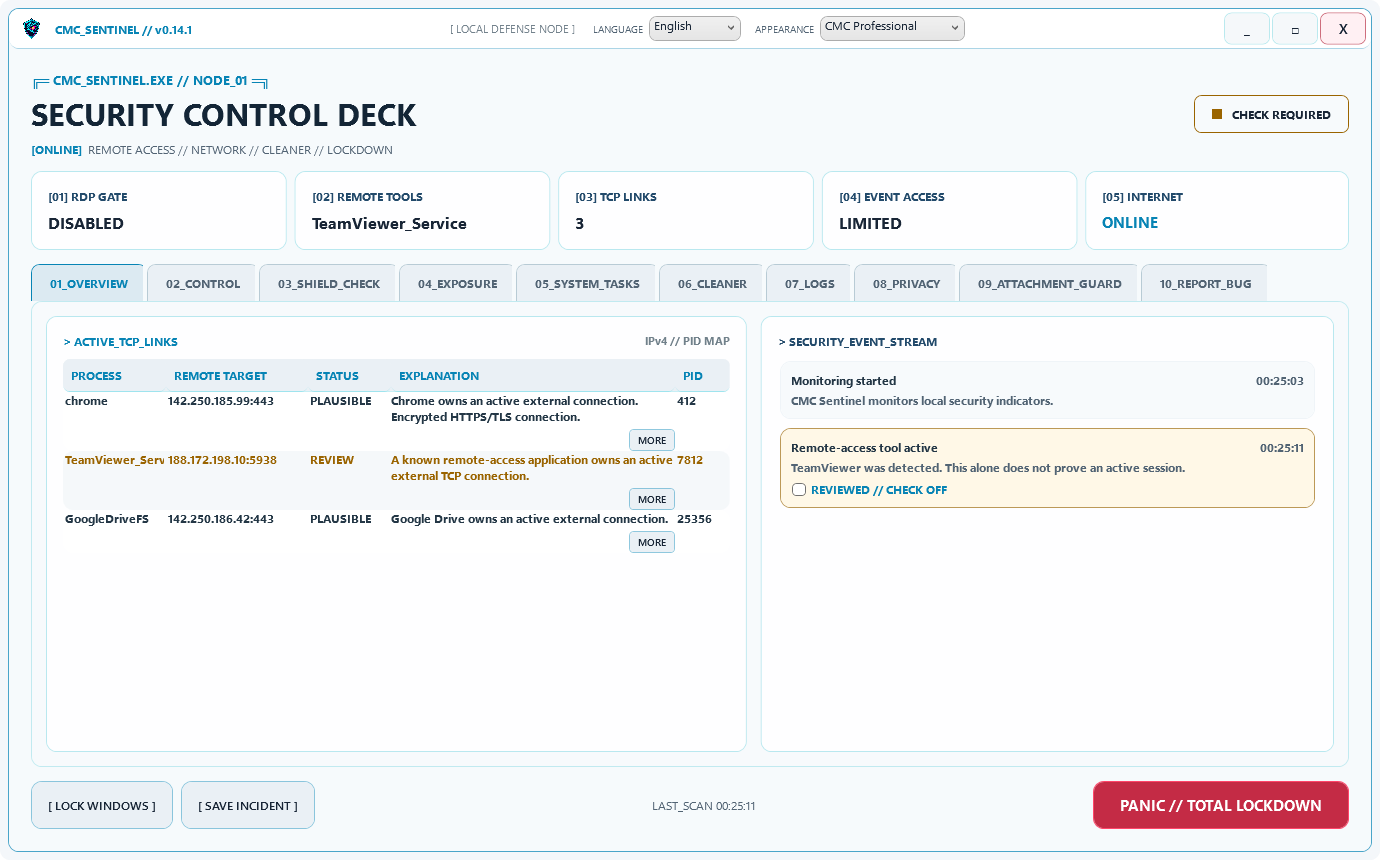
The app keeps observation and conclusion separate. An unknown process is not automatically malware, and one remote-access signal is not proof of an intrusion.
One subscription covers up to five active Windows PCs in one private household. The current installer may show a Windows reputation warning because it does not yet have a publicly recognised publisher signature; this is disclosed before purchase.
See Sentinel functions and screenshotsNot for every use case. GlassWire is the stronger fit for visual network history and bandwidth, Portmaster for privacy filtering and secure DNS, and Sentinel for guided Windows security visibility and focused response.
No. All three are positioned as complements to primary security protection. Keep Microsoft Defender or another suitable primary antivirus, Windows updates and reliable backups active.
Possibly, but do not assume that overlapping firewall, DNS, VPN or network filtering components will work together safely. Check the vendors' compatibility guidance and enable one control at a time.
One Sentinel subscription covers up to five active Windows PCs in one private household. Portmaster's paid plans also list up to five devices. GlassWire sells Premium by licence count.
Facts were checked against the vendors' own public pages on 30 September 2026. Product names belong to their respective owners. AZ-FIVE Industries is not affiliated with GlassWire or Safing.
CMC SENTINEL
Start Sentinel if process context, remote-access response, Attachment Guard and deliberate Shield checks match your problem better than a network-first tool.